Welcome to the warranty form for EGR Electric RollTracs
Below is what EGR require for processing warranty claims. Without the information this will hold up the claim and prevent EGR from servicing the customer's needs in a timely fashion.
Critical Information Required
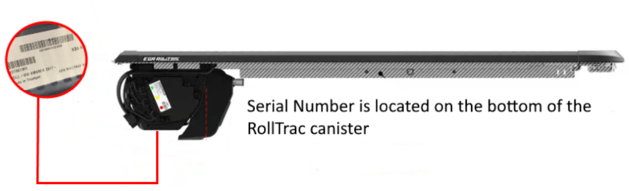
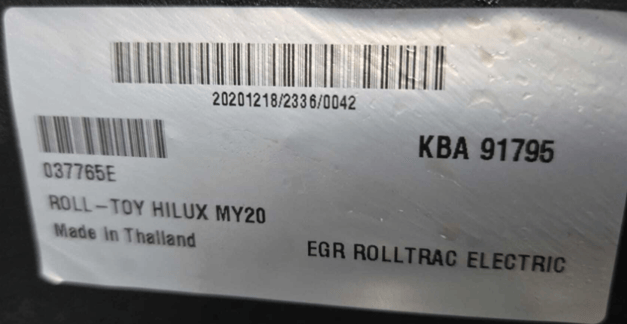
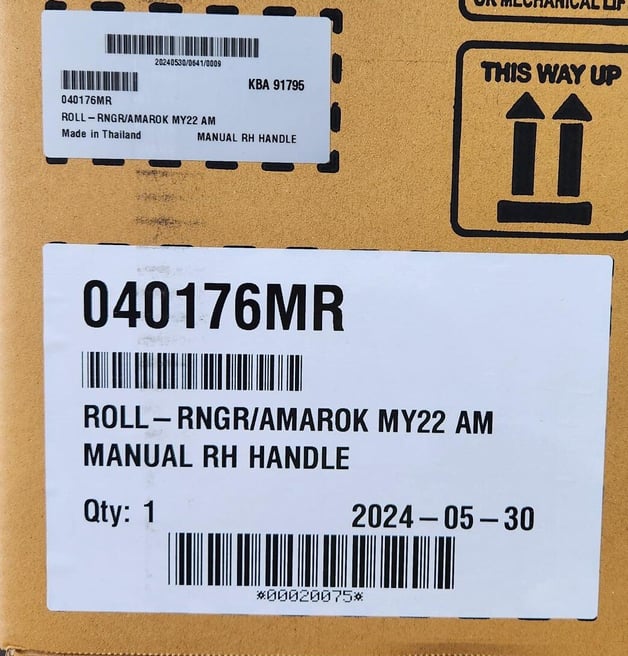
1. Serial Number
2. Proof of purchase (Purchase Order Number or Invoice Number) - warranty does not transfer to 2nd owners (refer owners manual)
3. Video of calibration after the unit has been Hard Reset - Video must include showing the buttons being held down for minimum of 10 seconds and display the internal light of the RollTrac after the buttons have been held down
You might ask "Why does EGR want a video?". Well by supplying this video, it will allow EGR to see what is going on with the EGR RollTrac and we can enter in the details into our RollTrac Diagnostic Tool.
How to conduct a Hard Reset / Forced Calibration
Hard Reset / Force Calibration
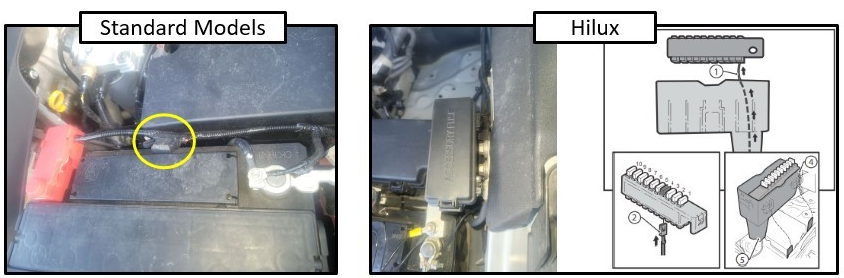
V1 and V2 Models
Step 1. Pull fuse for 30 seconds.
Step 2. Insert fuse
Step 3. Hold down both buttons (either side of RollTrac) for 10 seconds to start calibration
E3 Models - RollTrac Currently Closed
Step 1. Pull fuse for 30 seconds.
Step 2. Insert fuse
Step 3. Hold down both buttons (either side of RollTrac) for 5 seconds to start calibration
E3 Models - RollTrac Currently Open
Step 1. Pull fuse for 30 seconds.
Step 2. Insert fuse
Step 3. Place RollTrac in Manual Mode
Step 4. Pull RollTrac out partially (at least 1 slat must be out)
Step 5. Place RollTrac back in Electric Mode
Step 6. Hold down both buttons (either side of RollTrac) for 5 seconds to start calibration
Serial Number Location